WordPress modernization
Modernize your WordPress website without losing your content or SEO.
Plenty of WordPress marketing sites have grown slow and fragile: heavy themes, a long list of plugins and updates nobody wants to press. I rebuild them on Astro so pages load fast and stay easy to maintain, and I carry your content, URLs and SEO setup across so you don’t start from zero.
Send me an email
hello@mharoon.dev
You work directly with me, Muhammad Haroon: a software engineer with 5+ years of building web products and backends. See my work.
What changes after a migration
- Astro
- 71%
- WordPress
- 48%
Source: HTTP Archive technology report, as published on astro.build in September 2026.
A modern, responsive frontend
Templates rebuilt as clean, accessible components that work properly on phones, tablets and large screens.
Faster page delivery
Astro builds pages to HTML ahead of time and ships little or no JavaScript by default, so each page has much less to download and run.
Fewer moving parts
Front-end features that needed plugins become plain code you own: fewer updates, fewer conflicts and a smaller attack surface.
Easier maintenance
A typed, component-based codebase in version control that any competent frontend developer can pick up.
Your URLs and content, preserved
Existing URLs stay the same wherever possible. Anything that has to move gets a permanent redirect.
Editing where you need it
If your team publishes regularly, they keep a CMS for posts and pages, with no code involved.
An example rebuild
Hearthstone Home Studio is a concept project: an Elementor construction template rebuilt in Astro with the same layout, new branding and almost no JavaScript.
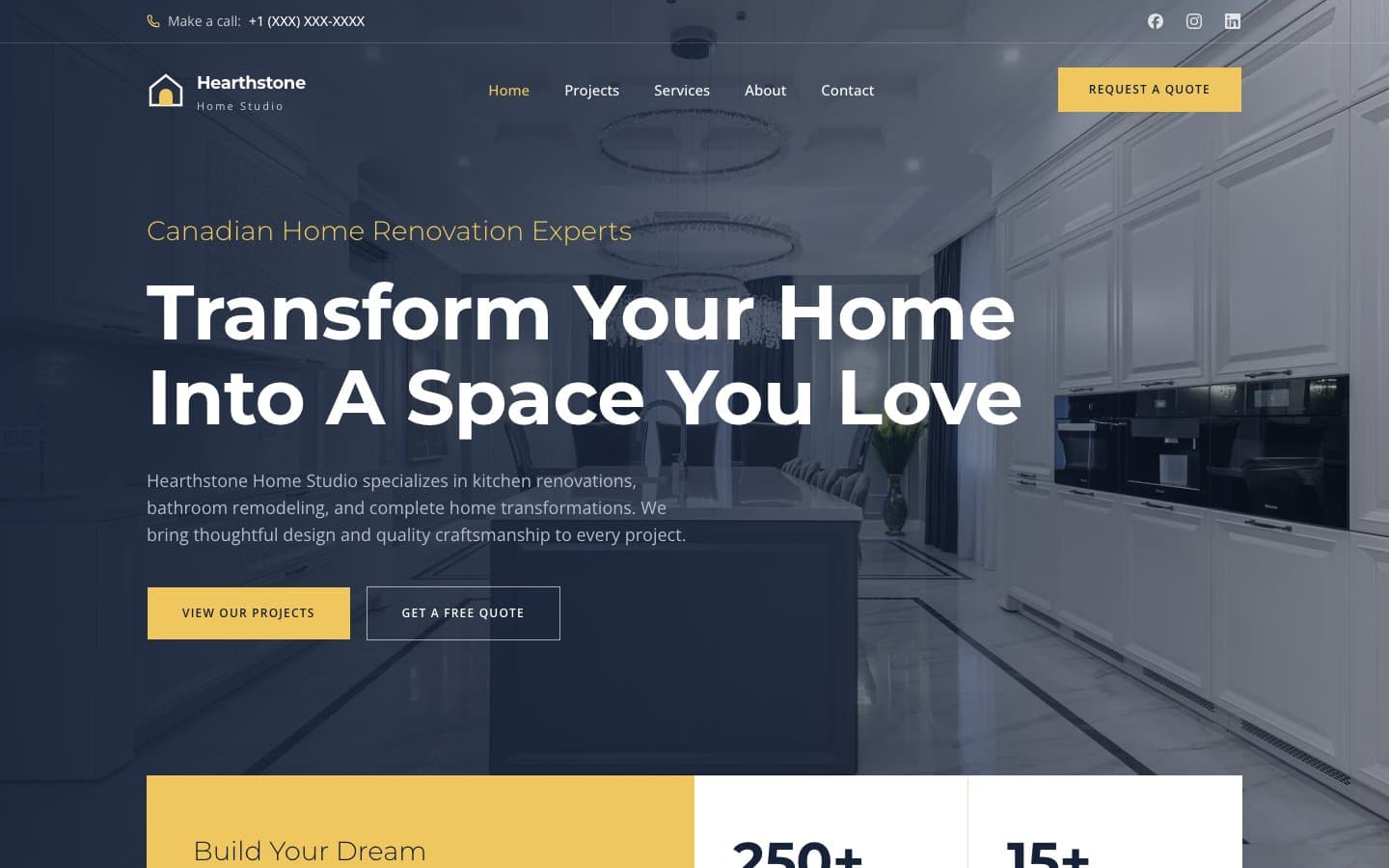
- PageSpeed Insights: 100 for performance, accessibility, best practices and SEO on desktop, and 99 for performance on mobile
- The original theme’s layout, spacing and hierarchy, rebuilt as Astro components
- Responsive AVIF and WebP images, served in several sizes
- Buttons and forms rendered to static HTML, with no framework JavaScript
- Scroll animations from a single 4.6 KB script
- Title, description, Open Graph image, sitemap and robots.txt
It’s a design and frontend rebuild, so it doesn’t include a content migration.
Two ways to migrate
The right setup depends on how often your team changes the site.
Option A
WordPress → Astro
Company sites, portfolios and documentation that change a few times a year.
Your content moves into the codebase as Markdown and the whole site is built to static files. There is no database, admin panel or plugin stack to keep patched. Content changes go through a developer or a simple Git-based workflow.
Option B
WordPress → Astro + EmDash
Blogs, resource hubs and marketing teams that publish every week.
EmDash is an open-source CMS built on Astro. Editors get an admin interface for posts, pages and media, while visitors still get a fast Astro site.
EmDash is new and still in beta, so I check that it covers what your editors rely on before recommending it.
Is your site a good fit?
Not every WordPress site should migrate. If yours is better off staying on WordPress, I’ll tell you.
Usually a good fit
- Marketing and company websites
- Blogs, news sections and resource hubs
- Service businesses whose site is mostly pages, posts and forms
- Sites where plugins mainly add front-end features: sliders, page builders, caching
Needs an assessment first
- WooCommerce stores
- Membership and subscription sites
- LMS and online course platforms
- Marketplaces and directories with user accounts
- Sites whose core business logic lives in plugins
What gets migrated
- Content
- Posts, pages, custom post types, categories and tags.
- Images and media
- Your media library, resized and served in modern formats.
- SEO metadata
- Titles, meta descriptions, canonical tags and social previews from your SEO plugin.
- URLs and redirects
- Existing permalinks kept where possible, with a redirect map for anything that changes.
- Forms
- Contact and lead forms rebuilt and connected to a form service or your CRM.
- Analytics
- Your analytics and tag setup carried over, so reporting continues through launch.
- Structured data
- Schema markup for your organization, articles and other content types.
- Editor workflow
- A Git-based workflow or an EmDash CMS, depending on how often you publish.
How a migration works
Audit
I review your pages, templates, plugins, integrations and highest-traffic URLs, and flag anything that makes a migration risky.
Migration plan
You get a written plan: which option fits, what moves where, the redirect map and a timeline.
Frontend rebuild
Your design is rebuilt in Astro as reusable, responsive and accessible components.
Content migration
Posts, pages, media and metadata are exported from WordPress, imported into the new site and checked.
Redirects and SEO validation
Every old URL is crawled against the new site. Titles, canonicals, sitemaps and structured data are verified.
Performance testing
Core Web Vitals and Lighthouse are measured on real templates before launch, not just the homepage.
Launch
The domain switches over, then I watch for crawl errors and broken links in the weeks after.
Common questions
Will I lose my Google rankings?
Any migration carries some risk, which is why URLs, metadata and redirects are planned before anything is rebuilt and verified before launch. The goal is for search engines to find the same content at the same addresses, served faster.
Can my team still edit the site?
Yes, if you need that. The Astro + EmDash option includes a CMS for editors. If you rarely update the site, plain Astro is simpler and cheaper to run.
What happens to my plugins?
Most front-end plugins (page builders, sliders, SEO and caching plugins) become unnecessary because the new site handles that in code. Plugins that run business logic, like stores or memberships, get a closer look during the assessment.
Where will the new site be hosted?
Astro sites run on most modern hosts, including Cloudflare, Vercel and Netlify. I recommend one based on your traffic, your team and your budget.
How much does a migration cost?
It depends on the size of the site and how much custom functionality it has. The assessment gives you a scoped plan and an estimate before any work starts.
Find out if your site is a good candidate.
Send me your website address and a line about what isn’t working. I’ll review it and reply with an honest view on whether a migration makes sense, and which option fits.